Traffic
The people an AI assistant actually sent to your site, from your own Google Analytics — who sent them, where they landed, and whether they converted.
Every other page in Recomma measures what an engine said. Traffic measures what happened next: the sessions on your site that began at ChatGPT, Perplexity, Gemini and the rest, read from your own GA4 property once a day. It is the first figure in the product that is a visitor rather than a mention.
Nothing is installed on your site and nothing is written to your Analytics. The connection is a read-only grant to one GA4 property, and the page reads rows Recomma pulled, so opening it costs your Analytics quota nothing.
Connecting
Settings → Connect Google Analytics sends you to Google’s consent screen. Two moves, because Google does not say which property you meant:
- Grant read-only access to Analytics. The same consent asks for Search Console, which a later page will read; granting it now means Google’s review of the app happens once.
- Choose the property — and the web stream, if the property has more than one. The first ninety days arrive on the next scheduled pull, usually within the hour, and every day after that the last three days are read again, because GA4 keeps revising a day for about that long.
One property per project. A project whose site is measured under two properties connects the one that holds the pages assistants cite.
If Google stops honouring the grant — the account that connected it left the company, or the app was removed under the account’s third-party access — the page says so and offers to reconnect with the property kept. The rows already pulled stay.
Which sessions count
Two rules, both applied:
- GA4’s own flag. Since May 2026 GA4 marks a session whose referrer is on
its list of AI assistants with the medium
ai-assistant— ChatGPT, Gemini, Deepseek, Copilot, Grok. - Recomma’s own list. GA4’s list leaves out Perplexity, Claude, Meta AI and You.com, whose visits arrive as ordinary referrals. Recomma matches the referrer host against its own list as well, so those count too.
A session GA4 flagged from a host Recomma does not recognise is counted as Other AI rather than dropped: it is AI traffic, just not attributed to a name. A session neither rule matches is not AI traffic, as far as either can tell.
Landing pages are folded to one path with the query dropped, because
ChatGPT’s ?utm_source=chatgpt.com stamp is the assistant’s mark rather than a
second page.
The Overview
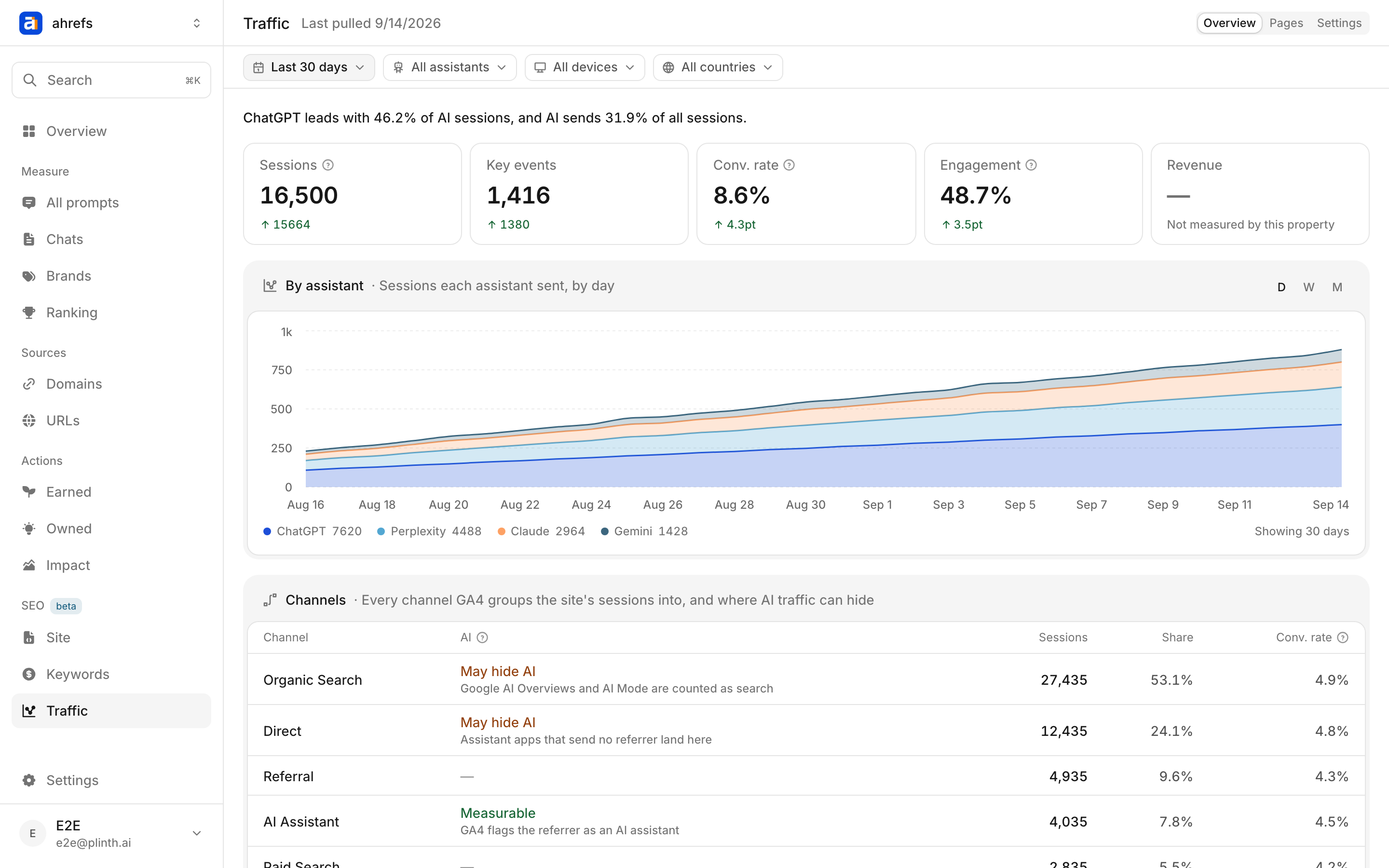
The sentence at the top names the leading assistant, its share of AI sessions, and what share of all the site’s sessions AI sent. Under it, five tiles, each with its movement against the window before:
| Tile | What it counts |
|---|---|
| Sessions | Sessions that began at an assistant, over the window |
| Key events | GA4’s key events (conversions) in those sessions |
| Conv. rate | Key events ÷ sessions |
| Engagement | Engaged sessions ÷ sessions, by GA4’s definition — over ten seconds, a key event, or a second page |
| Revenue | Purchase revenue attributed to those sessions |
A property that does not measure a thing shows a dash, not a zero. A site with no key events set up has not converted zero visitors; it has not counted. The same for revenue on a property without e-commerce.
A movement is shown only when both windows rest on at least twenty sessions. Under twenty sessions in the window the figures render greyed: they are real, and too thin to read a rate off.
The chart stacks sessions by assistant at the day, week or month grain, so its height is the total and its bands are the split.
The Channels table
Every channel GA4 groups the site’s sessions into, with the AI column saying what GA4 can and cannot attribute:
| Channel | AI column | Why |
|---|---|---|
| AI Assistant | Measurable | GA4 flags the referrer, and Recomma’s list adds the assistants it misses |
| Organic Search | May hide AI | Google’s AI Overviews and AI Mode are counted as search, by GA4’s own definition |
| Direct | May hide AI | Assistant apps that send no referrer land here |
So the AI sessions above are a floor. The honest reading of “AI sends 4% of your traffic” is “at least 4%, and the rest may be in these two rows”. The table is drawn even before a connection exists, because it is the reason to connect.
Pages
Two lists from two tables. Landing pages are where an assistant’s visitors arrived, with sessions, share of AI sessions, key events and conversion rate per page. Conversions by page are where their key events fired, which is often a later page than the one they landed on.
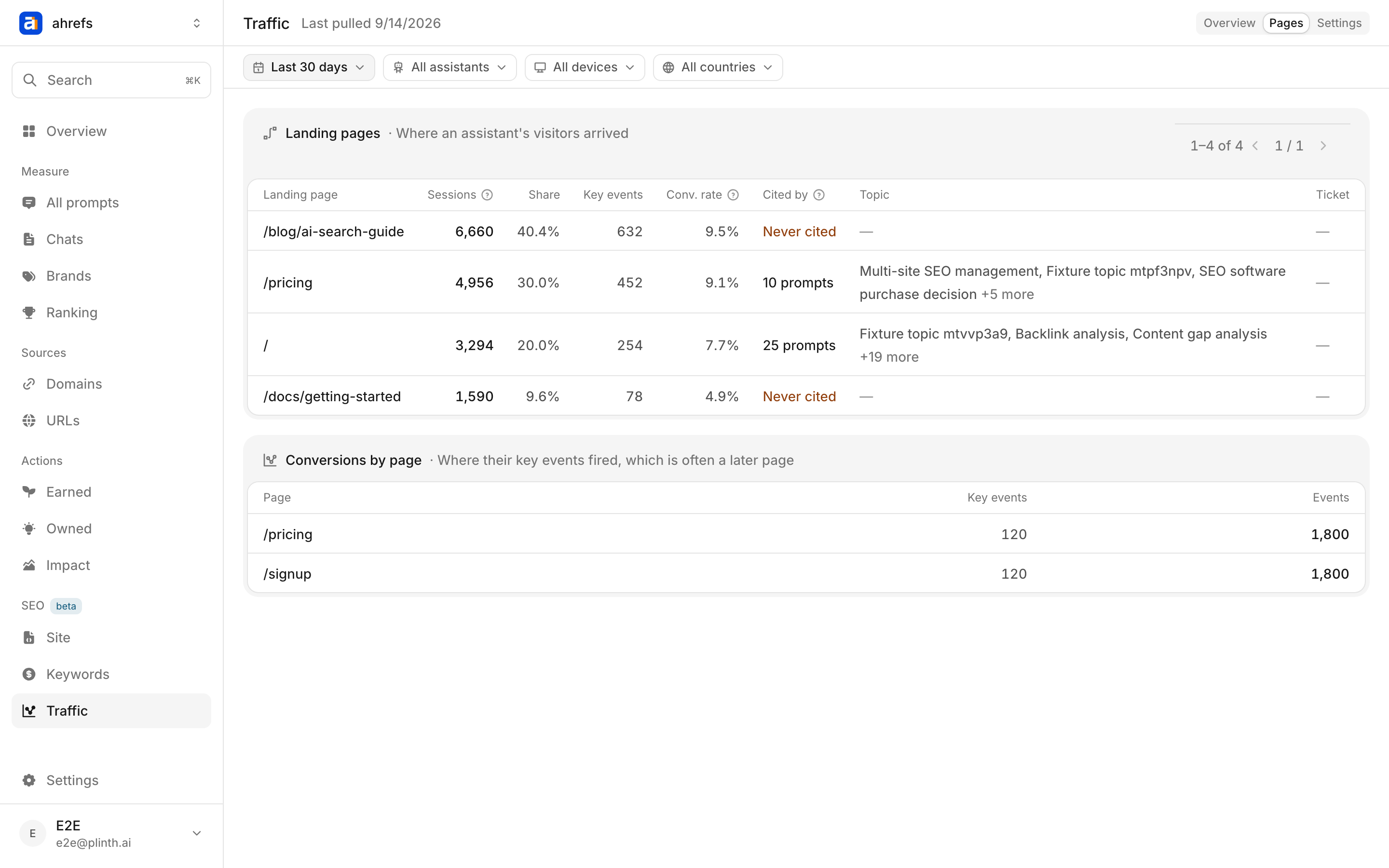
After the five columns any GA4 reader shows come four that only Recomma can fill, because they join the landing page to what the product already measures:
| Column | What it shows |
|---|---|
| Cited by | How many tracked prompts’ answers have ever cited this page — click to list them, each tagged with whether the citation came from a model’s API answer or the real interface. Never cited means an assistant sent people to a page no sampled answer has quoted: a page your prompt set does not know about |
| Topic | The topic those prompts sit in |
| Pool value | What that topic is worth per month in the keyword pool. Only drawn once a pool is built and placed; never a zero |
| Ticket | Whether a Site health ticket is open on this page |
The two fidelities are kept apart on purpose. If most landing pages read Never cited, that is a finding about the prompt set — or about how far the URLs a model’s API answer cites match the ones the real interface shows — and not a fault in the join.
The filters at the top — window, assistant, device, country — narrow both views. Share of site is blank under a device or country filter, because the site-wide count carries neither and a share of the wrong whole is not a share.
Settings
The account, property and stream the page reads, when it was last pulled, and the last error if a pull failed. Force reauthentication takes a fresh grant from Google with the property kept. Remove connection deletes the grant and every row pulled under the project, and needs an admin: the last ninety days come back on a reconnect, but days GA4 has since aged out do not.
Before a connection
The page is the connect button and the Channels table’s two May hide AI rows. It is never empty: the reason to connect is written where you are deciding whether to.